Building the foundation for a scalable livestream experience
ROLE
Product Designer

DURATION
8 Weeks
TEAM
1 Product Manager
1 Product Designer
1 Engineers
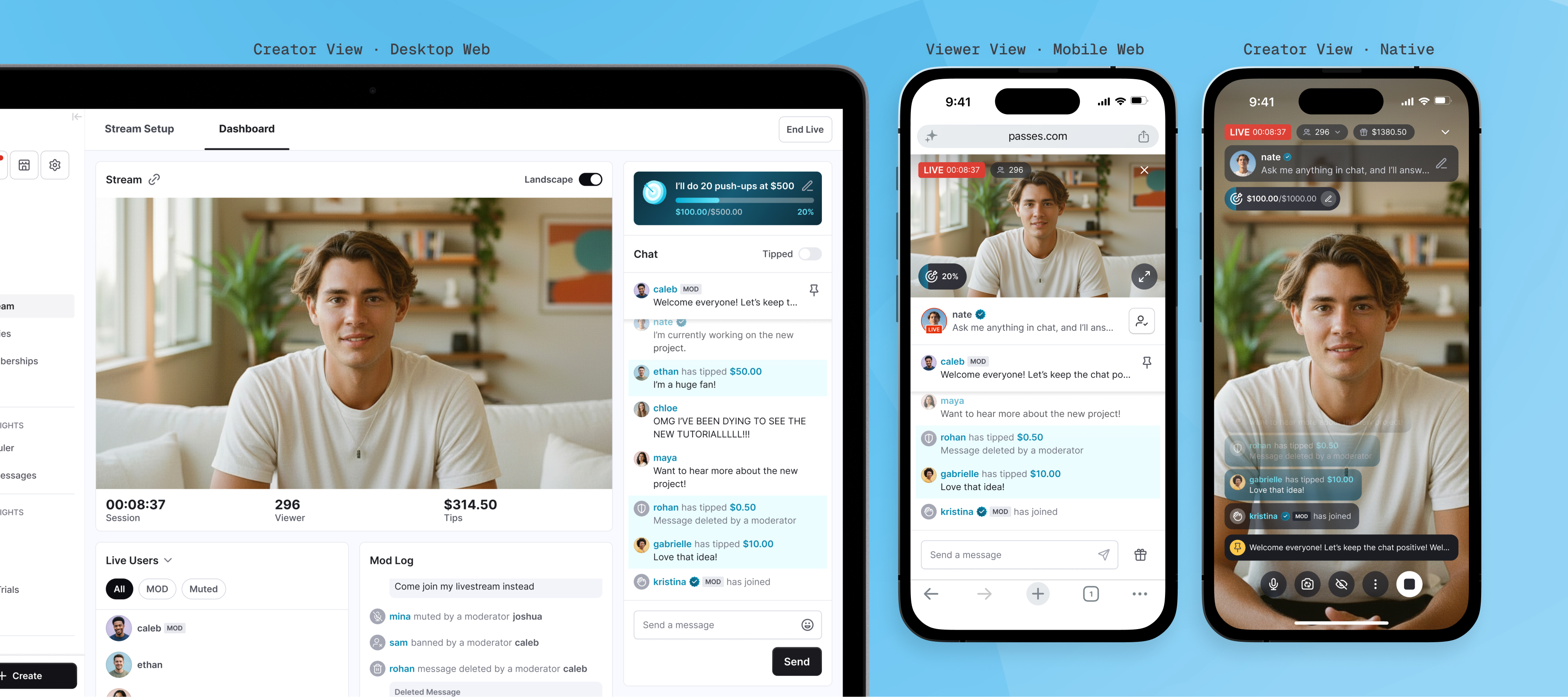
Making room for new roles, moderation, and real-time interaction without compromising the core live experience across native and web
Context
Passes is a creator monetization platform where creators earn directly from their audiences through memberships, messaging, livestreams, and other paid experiences. Livestream already supported paid access, real-time chat, and tipping across native and web. I joined the work through feature-level roadmap briefs for new monetization, moderation, audience-management, and creator tools. There was no separate foundation-redesign initiative.
Challenge
Auditing the shipped experience revealed that the existing livestream foundation wasn't ready to absorb that growth. The live interface was already dense, responsive behavior could deprioritize critical interactions, and core viewer behavior varied across platforms, making it difficult to add new capabilities without compounding complexity.
Approach
Rather than continuing to layer features onto the existing experience, I proposed and scoped a focused redesign of the livestream foundation alongside the roadmap. I reworked live hierarchy and responsive behavior, aligned the core viewer model, and introduced clearer operational and role structures before integrating the new capabilities.
Outcome
The redesigned foundation and roadmap capabilities shipped together across native and responsive web, turning Livestream into a more coherent system for real-time interaction, moderation, monetization, and audience management.
AUDIT & SCOPE
The roadmap exposed a deeper problem
Before designing the new capabilities, I tested the shipped creator and viewer experiences across native and responsive web, including different viewport sizes and stream orientations. Three structural constraints consistently surfaced:
- The live interface was already at capacity
- The layout didn't protect live interaction across screen sizes
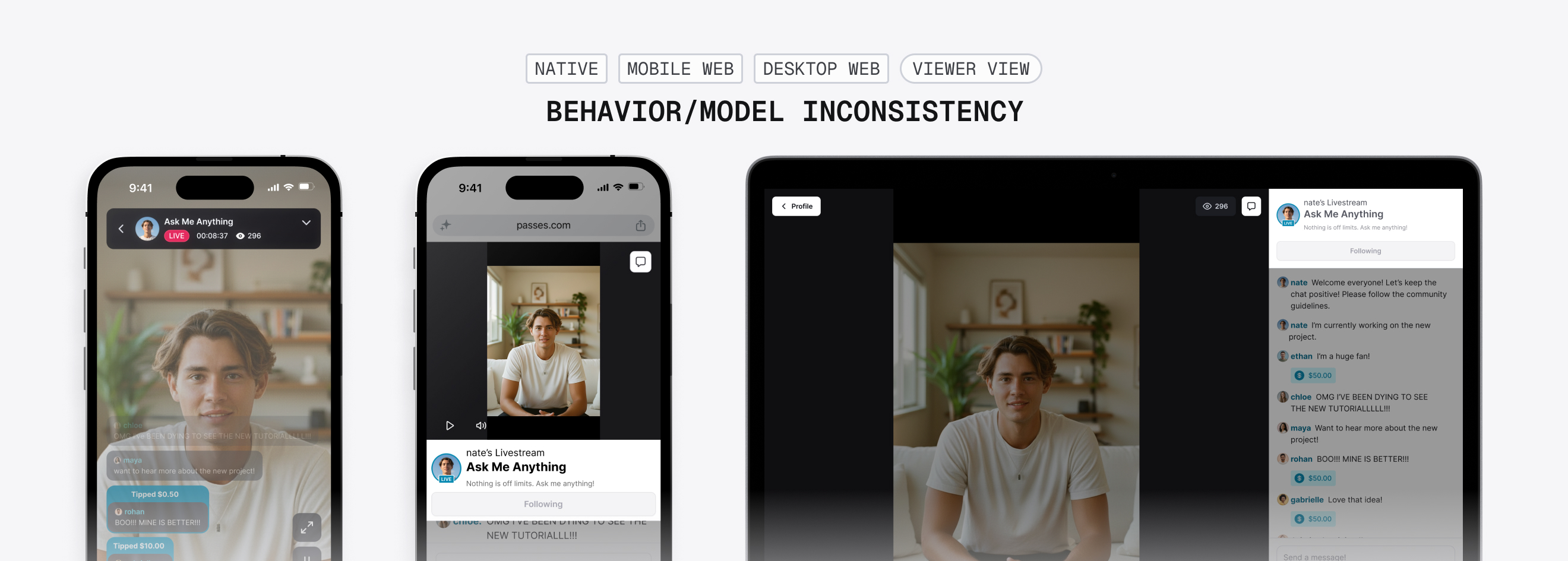
- Core viewer behavior changed across platforms
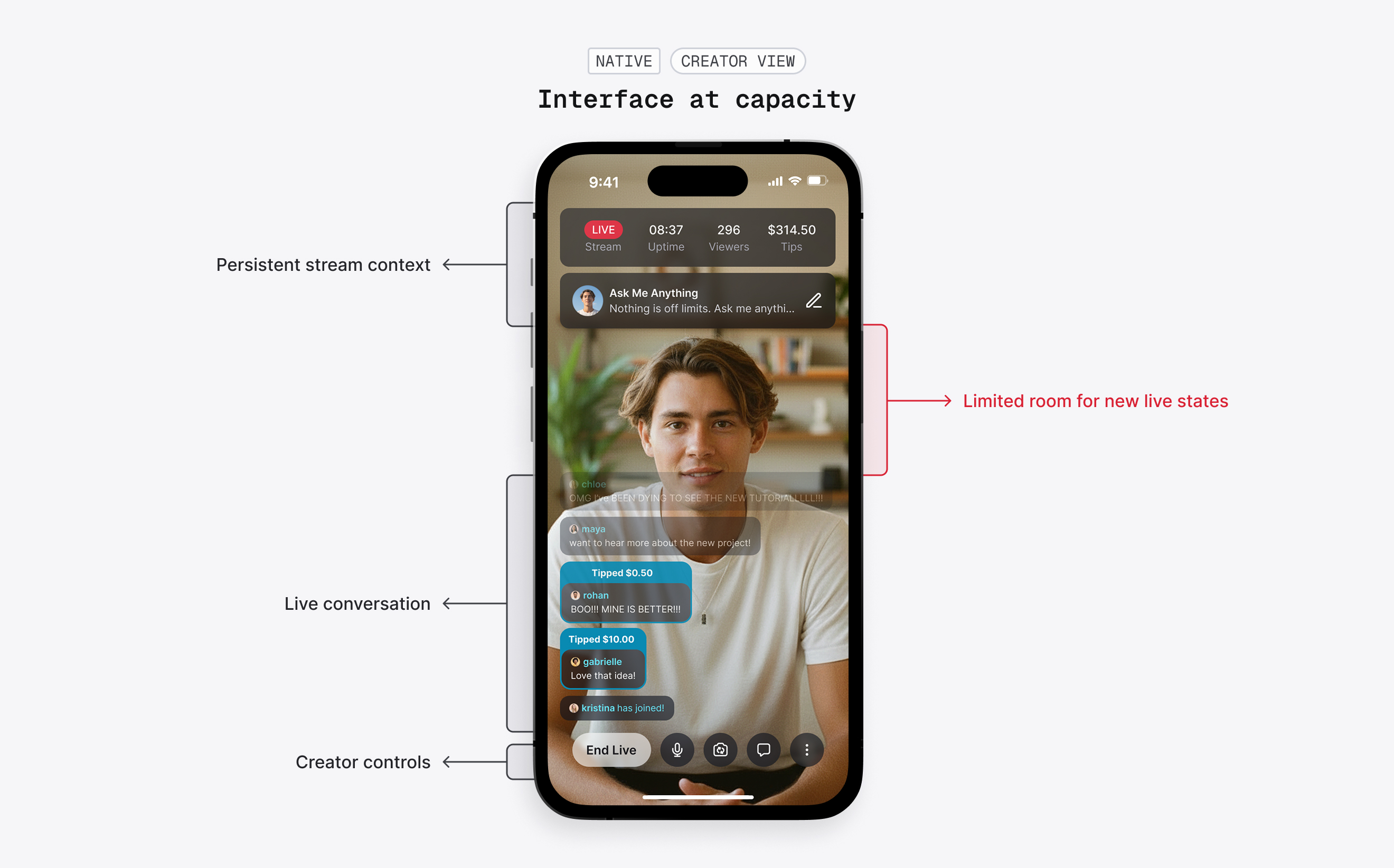
The live interface was already at capacity
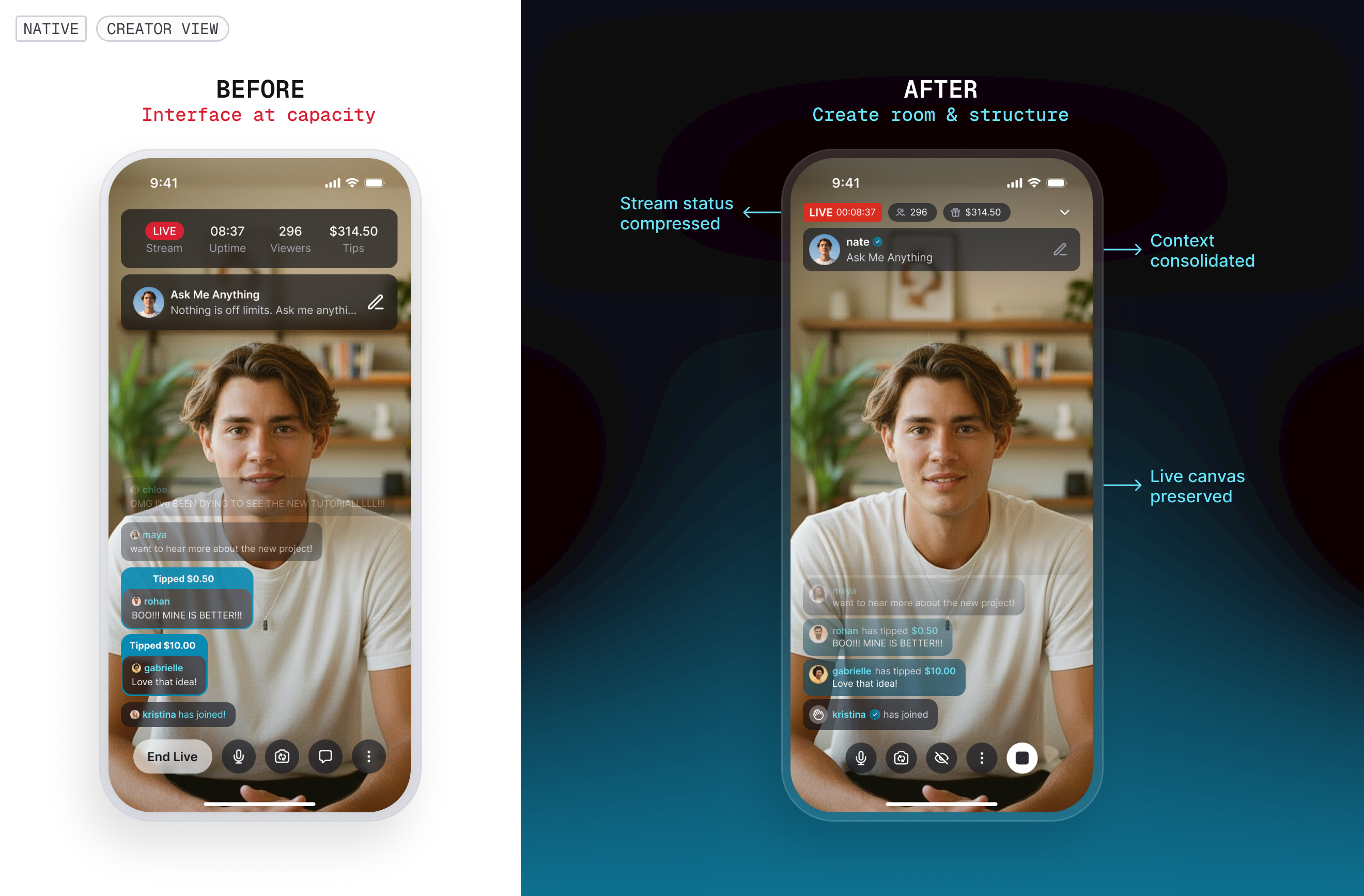
On native, stream information, creator context, conversation, and controls were already competing for a limited video canvas. Adding moderation, audience management, and monetization directly into the same structure would only increase that competition.
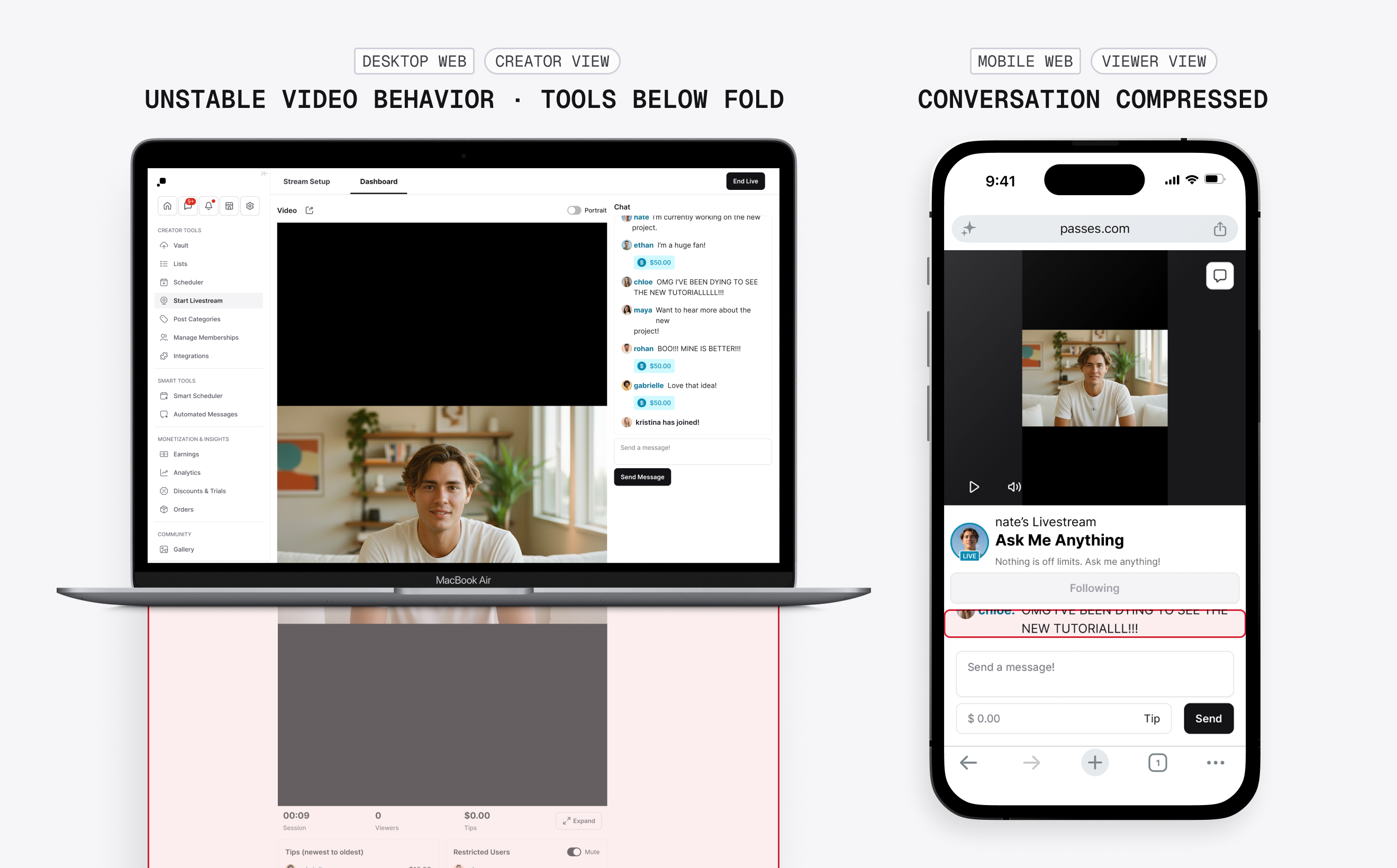
The layout didn't protect interaction across screen sizes
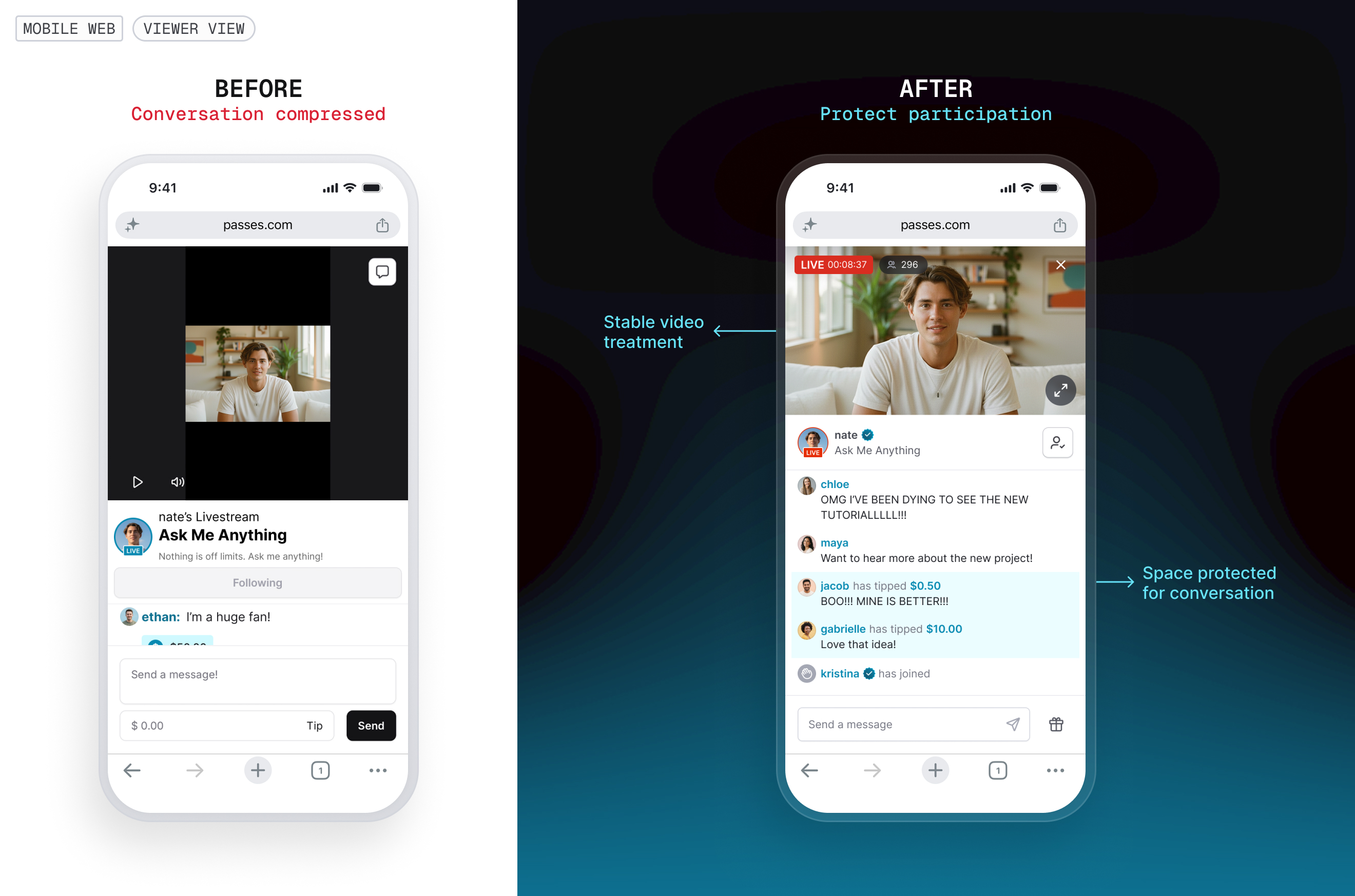
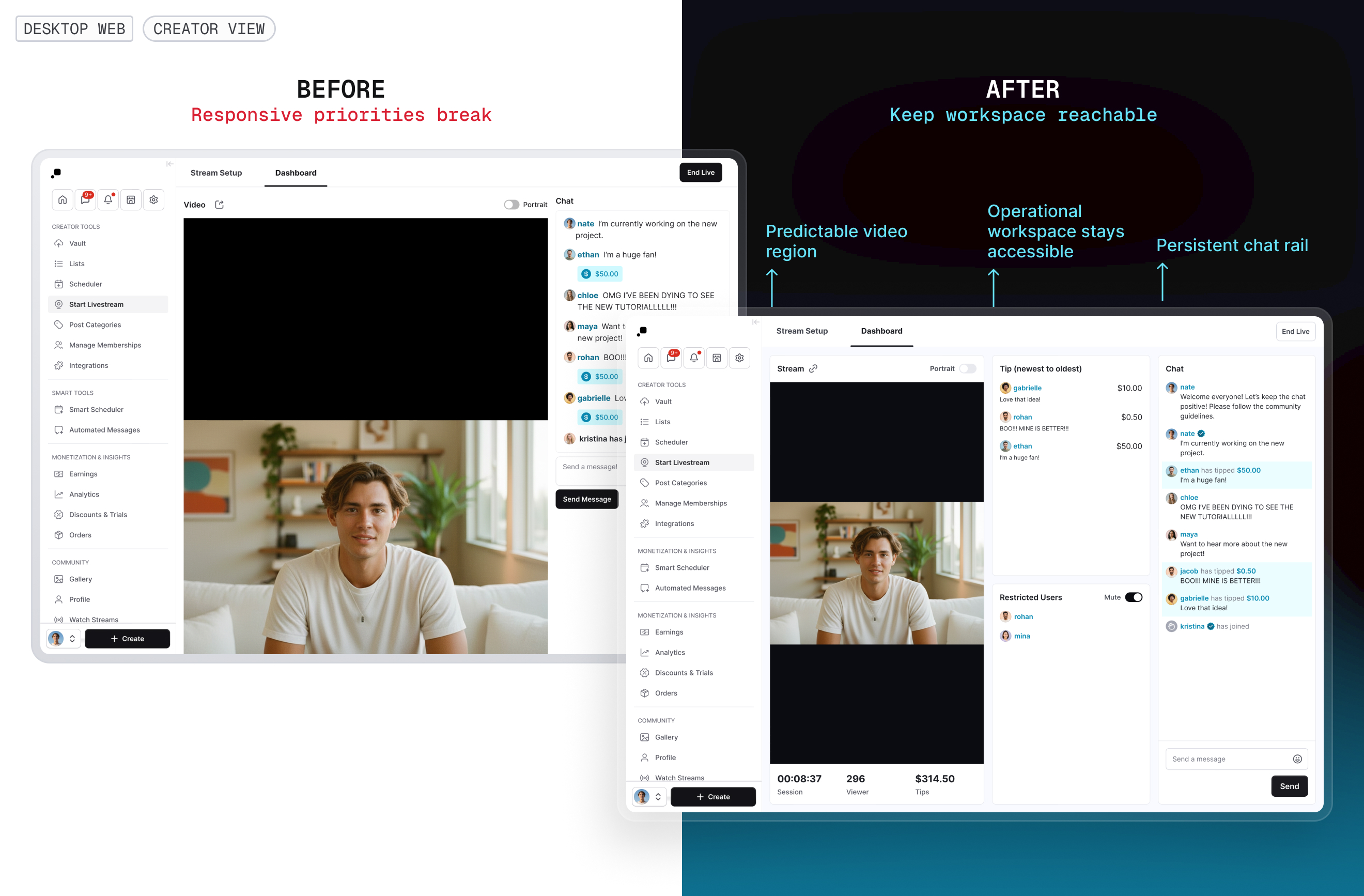
Across responsive web, the layout adapted around the video without reliably preserving the interactions surrounding it. Creator tools could fall below the fold as viewport or video orientation changed, while viewers on smaller screens could lose most of the conversation to video and surrounding UI.
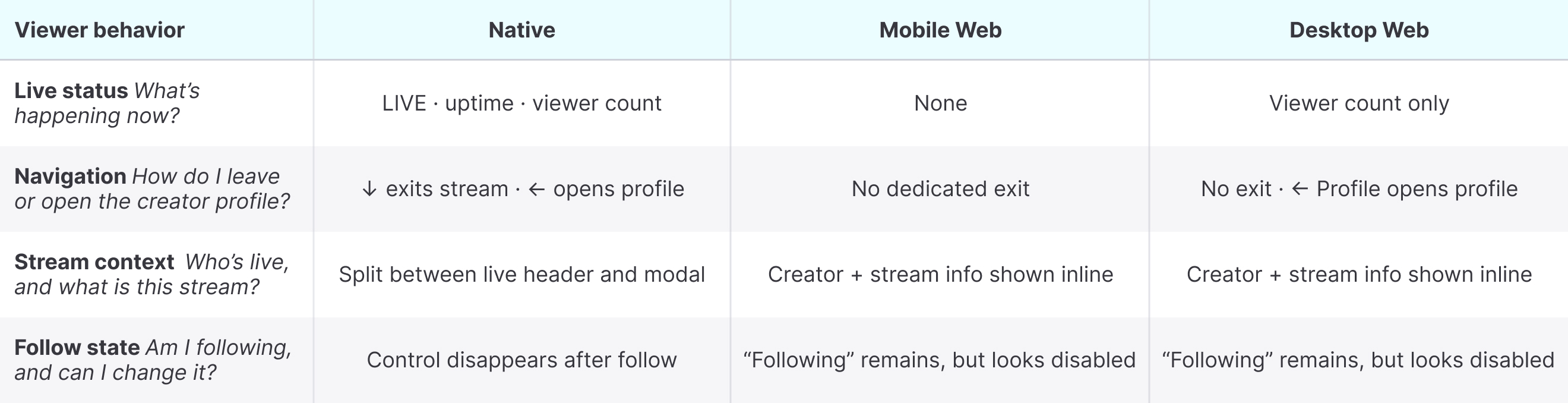
Core viewer behavior changed across platforms
The same livestream exposed different information and behaviors depending on where viewers joined. The differences affected what viewers could understand and how they moved through the experience, not just how the interface looked.
The issue wasn’t visual parity. The same core viewer concepts behaved differently across surfaces.
The feature roadmap was becoming a systems problem
Adding the roadmap feature by feature would preserve the same structural constraints while introducing more roles, states, and controls. I brought the findings to the team and proposed addressing the livestream foundation alongside the roadmap.
Then, to avoid turning the feature roadmap into an open-ended redesign, I focused the foundation work on structural changes that either enabled upcoming capabilities or addressed immediate usability constraints, while deliberately leaving improvements the roadmap didn't depend on for later.
Here’s what I chose to fix:
Create room and structure for new live interactions
Give upcoming capabilities clear places within the live workflow.
Protect participation across responsive states
Keep video, conversation, and critical operational tools usable as space changes.
Align the core viewer model
Make essential stream information and navigation predictable across platforms.
FOUNDATION
Shifting from a video-first layout to an interaction-aware livestream experience
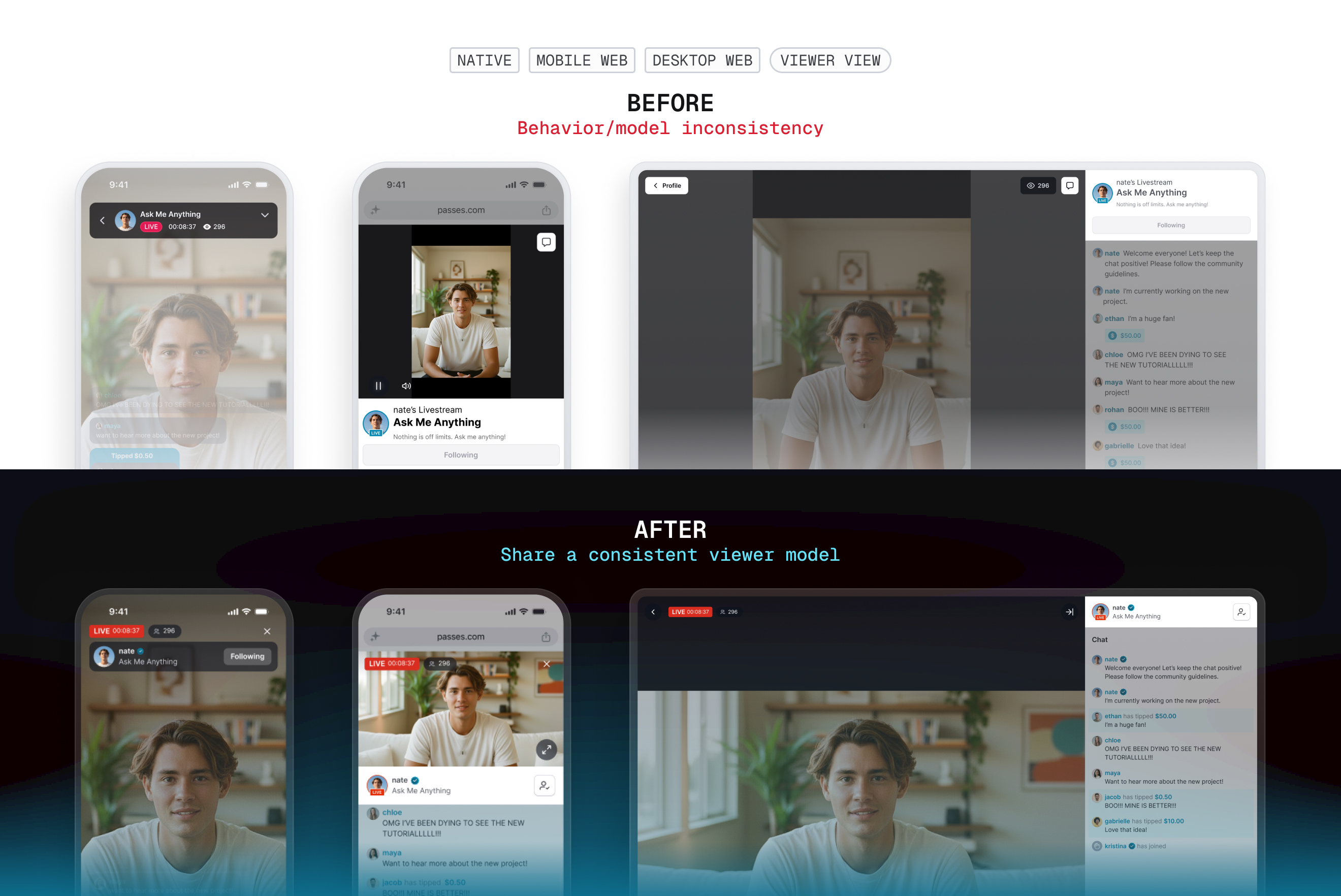
Video remained central, but it could no longer determine whether the interactions around it stayed usable. I reorganized the live surfaces around the information and actions creators and viewers needed most, then defined responsive behavior to preserve those priorities as available space and stream conditions changed.
Creating room on the live canvas
On native, I consolidated persistent stream information and creator context into a more compact hierarchy so the live canvas could support a growing set of interactions without continuously covering more of the video.
Keeping critical interactions in reach
On responsive web, I stabilized video behavior around the interactions users needed to preserve. For creators, I removed layout behavior that pushed operational tools out of reach and kept chat persistently accessible. For viewers, I reduced surrounding UI so conversation remained usable across smaller viewports and video orientations.
Making the viewer model predictable across platforms
I standardized the information and navigation viewers relied on during a stream. Uptime and viewer count became consistently visible, exiting became explicit, and creator identity became an intentional route to the creator profile rather than part of the exit behavior.
With the core layout and viewer model stabilized, the next challenge was deciding where a growing set of real-time information and management tools should live.
ARCHITECTURE
Organizing the workspace around conversation, people, and moderation
As new capabilities entered the roadmap, the challenge shifted from creating enough room to deciding what belonged where. Rather than giving every feature its own surface, I looked for a structure that could organize the growing live experience around stable areas of work.
From a feature list to a workspace architecture
The existing dashboard already needed to support Chat, Tips, Restricted Users, viewer count, and stream metrics. The roadmap was adding Viewer List, Viewer Notes, moderator activity, Mod Log, and Pinned Messages.
I reviewed how established livestream products handled similar complexity. Their strategies ranged from highly configurable workspaces to more constrained dashboards, but a recurring distinction emerged between real-time stream operations and longer-lived configuration or administration.
I used that distinction as an input rather than copying any single dashboard.
Keep real-time work close
Conversation, audience state, and moderation activity need immediate access.
Separate operation from administration
Role management and setup don't need to compete with the active session.
Add structure before configurability
The roadmap could be supported without introducing a fully customizable workspace.
Exploring the architecture
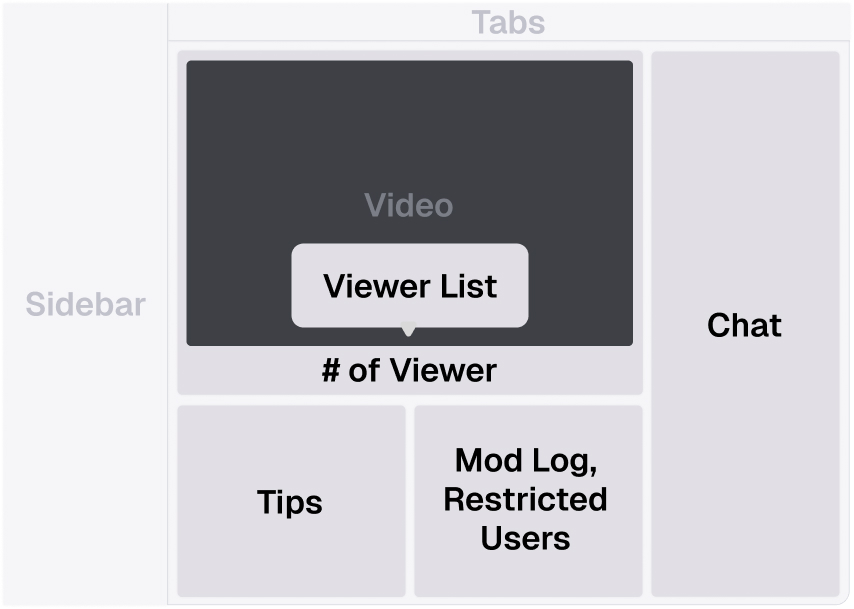
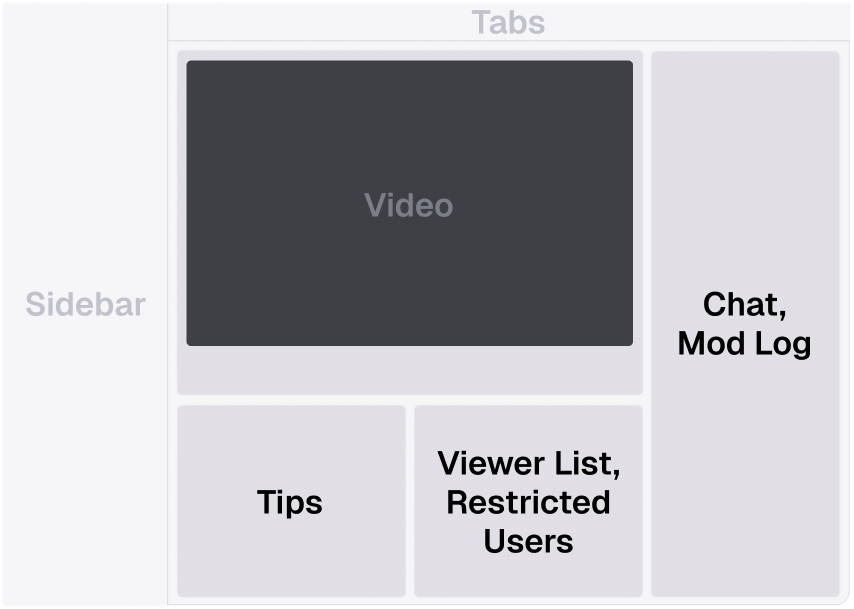
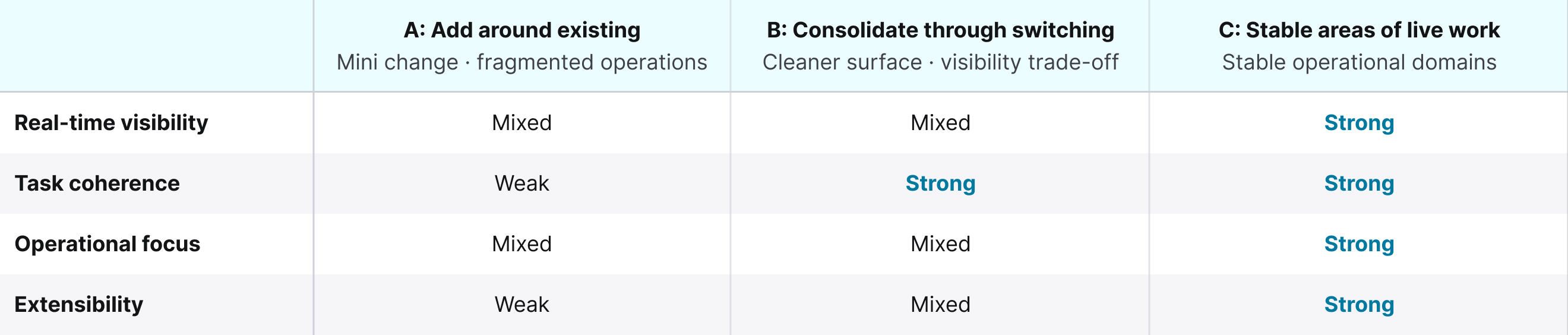
I explored three approaches to distribute the core stream, chat experience, and new capabilities across the creator workspace, then evaluated them against real-time visibility, task coherence, operational focus, and extensibility.
Explored Directions
- A: Add around the existing structureMinimal structural change, but people and moderation tasks remained fragmented.
- B: Consolidate through switchingFewer persistent panels, but high-frequency information competed behind toggles.
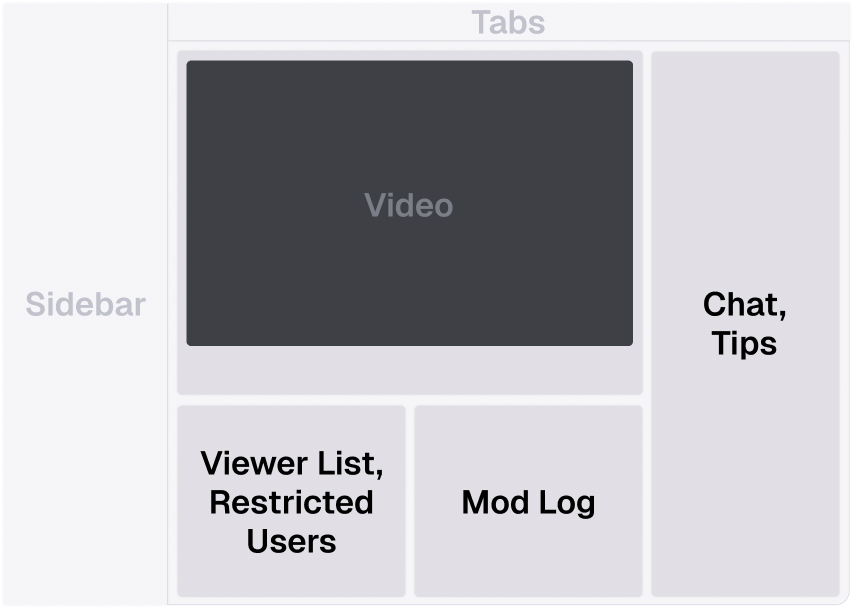
- C: Organize around stable areas of live workCreated stable places for conversation, people, and moderation activity while keeping high-frequency information visible.
Evaluation Criteria
- Real-time visibility: Does high-frequency live activity remain visible?
- Task coherence: Are related information and actions kept together?
- Operational focus: Does the workspace prioritize what needs to happen during the stream?
- Extensibility: Can new live states fit without introducing another disconnected surface?
I selected direction C, creating three stable areas of live work: conversation, people, and moderation activity. This kept high-frequency interaction visible while giving audience and moderation workflows dedicated places to grow.
Direction A
Direction B
Direction C
Structuring audience management around live participation
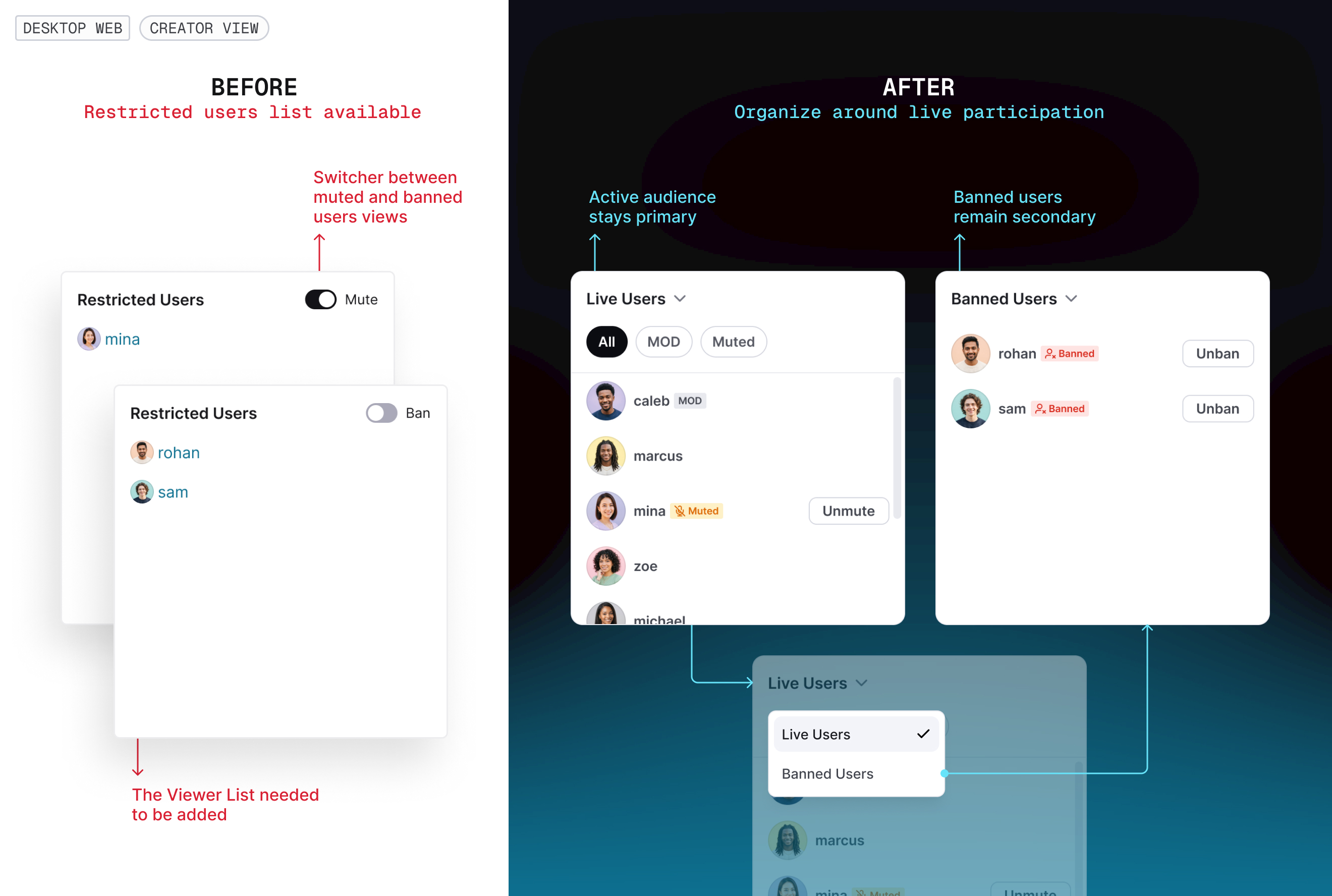
The new Viewer List raised a structural question: should active viewers and restricted users remain separate features, or become part of one people-management model?
I organized them around the live audience instead. Live Users became the default view, with All, MOD, and Muted as states within the active audience. Banned Users remained available as a secondary view because restriction reversals could still be time-sensitive, but banned users no longer competed with active participants in the default view.
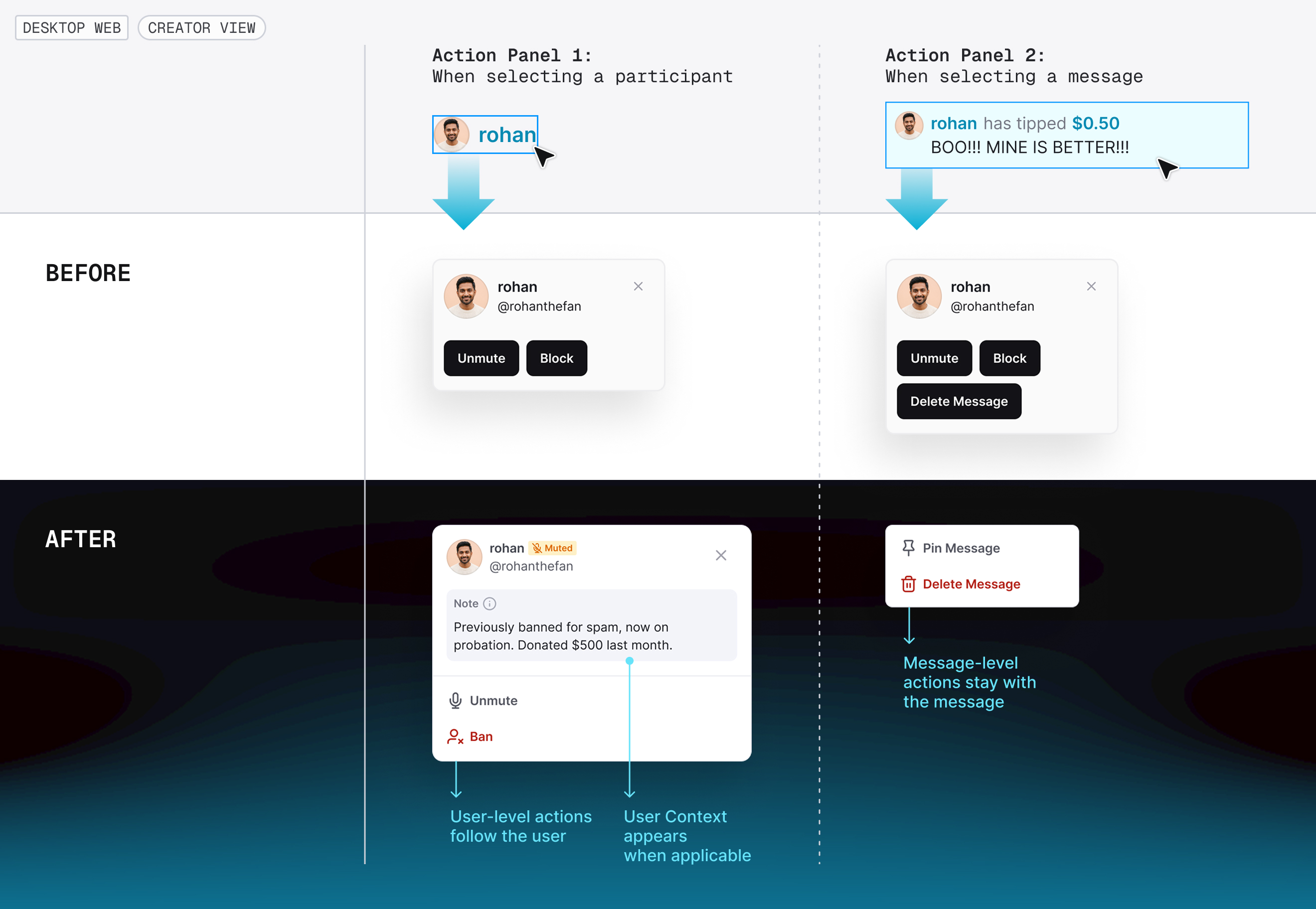
The same viewer could now appear in Chat, Live Users, Banned Users, and Mod Log, so I also normalized actions around the object being acted on rather than the panel it came from. Selecting a viewer opened a consistent user context; selecting a message exposed only message-level actions. With the workspace organized, the next question was what context and authority moderators needed to manage it effectively.
MODERATION
Designing moderation as an operational role
The goal of Human Moderation was straightforward: let creators delegate moderation so they could stay focused on hosting. The Product Requirements Document defined a set of moderation actions, but treated moderator access as session-based and assumed moderators would join through the viewer experience with elevated controls.
Working through those assumptions exposed a larger problem: moderation needed a role model, not just more buttons.
Defining a persistent moderator role
The PRD initially treated moderator access as session-based, which would require creators to rebuild the same trusted moderation team for every livestream. Through design review, we reframed it as a persistent role: once assigned, MOD access carried across future streams until the creator removed it or the moderator no longer met a follower requirement.
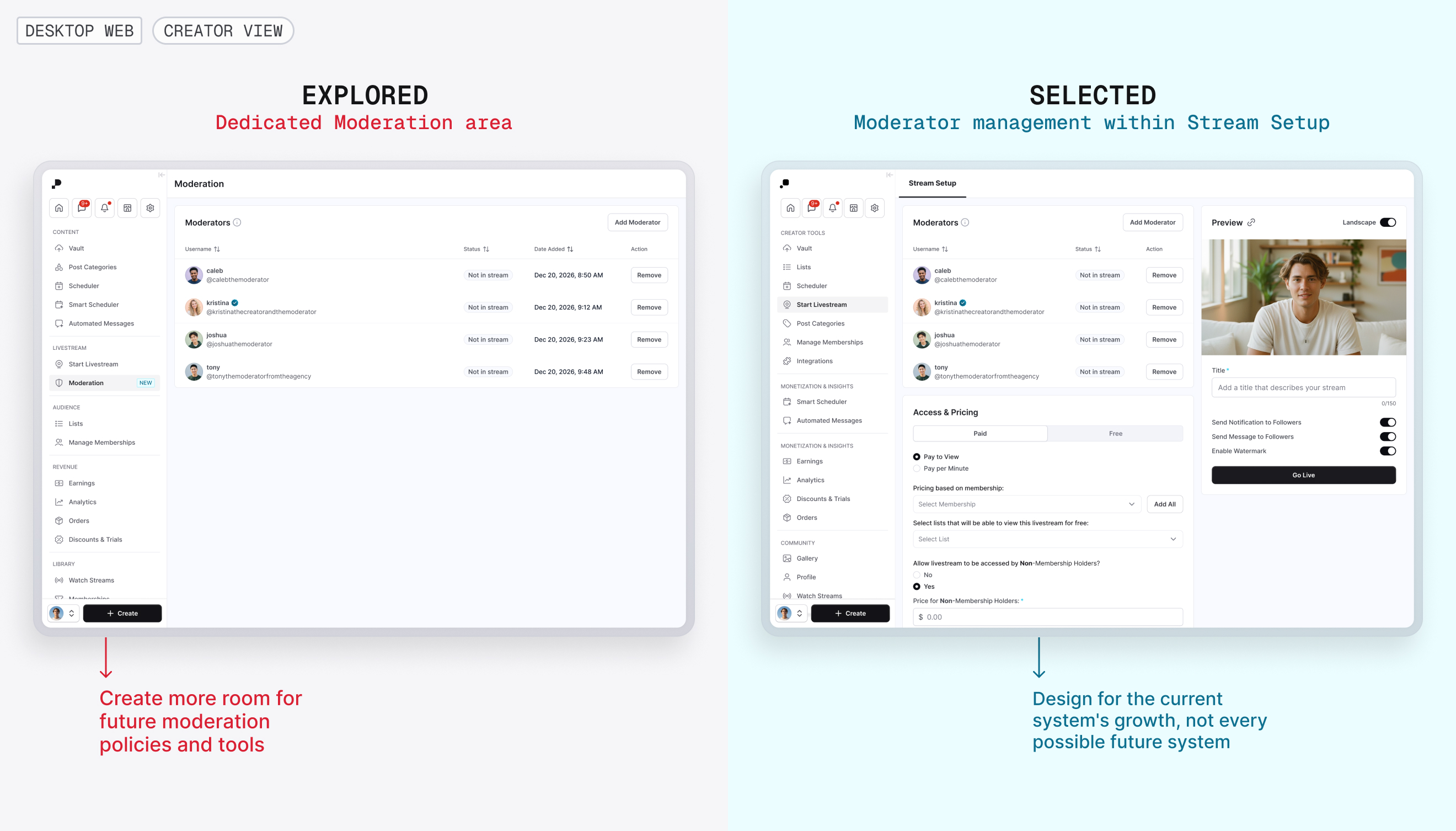
Making moderator assignment last beyond a single session raised a management question: should moderator management become its own administrative area or remain within Livestream Setup?
I explored a dedicated Moderation area versus keeping moderator management within Stream Setup. A dedicated area offered more room for future moderation policies and tools, but moderation remained livestream-specific with no confirmed broader suite. So, I kept moderator management within Stream Setup rather than introducing a larger administrative architecture prematurely.
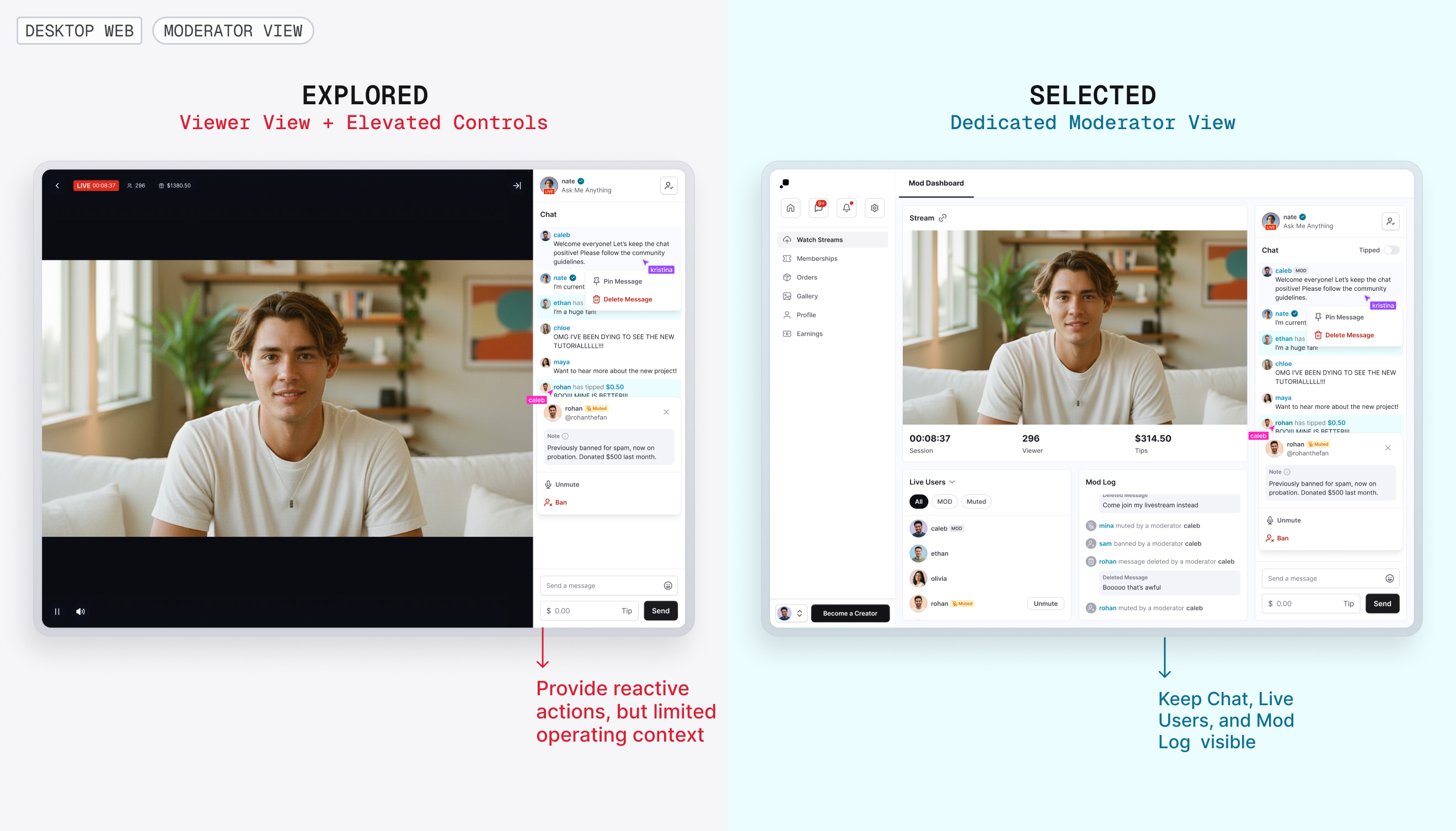
Moderators needed operational context, not just controls
The brief also assumed moderators would join through the existing viewer experience with elevated controls. That model worked for isolated actions, but gave moderators little visibility into who was present, what restrictions were active, or what moderation actions had already occurred.
I evaluated keeping moderation within the viewer experience versus extending the creator workspace into a dedicated Moderator View. I chose the dedicated workspace, preserving Chat, Live Users, and Mod Log while removing controls tied to stream ownership, monetization, and role management.
This established a simple responsibility model: Creators own the stream, Moderators manage its health, and Viewers participate.
Designing permissions around valid states
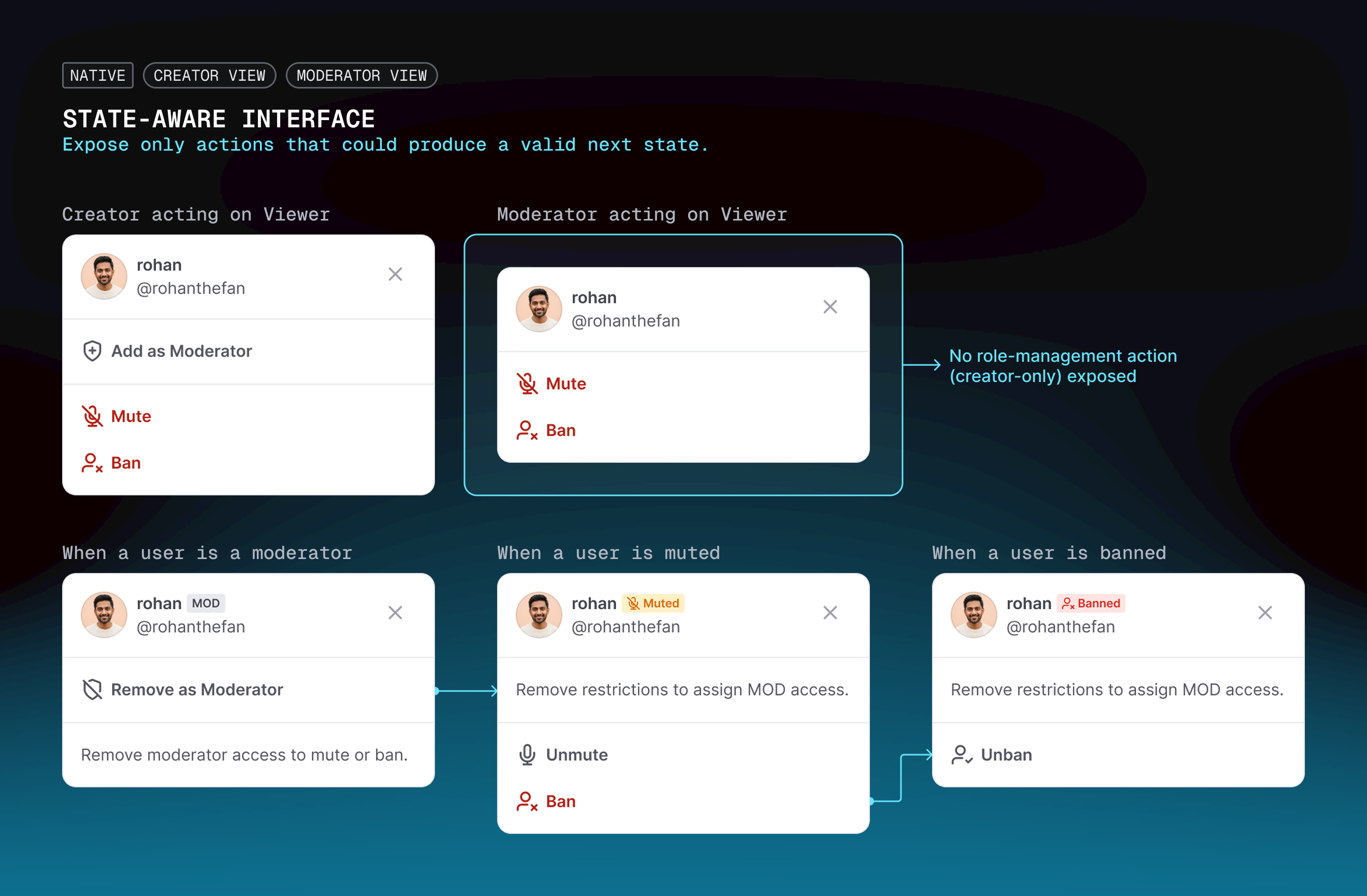
Adding the new role exposed another interaction problem: the same participant could appear as a regular viewer, moderator, muted viewer, or banned viewer, and the actions available to the person moderating them needed to reflect that current state.
For creators, role management and viewer restrictions were mutually constrained. An active moderator first had to lose MOD access before they could be muted or banned, while a restricted viewer had to be unrestricted before they could be assigned as a moderator. Rather than exposing conflicting actions and resolving them afterward, I reflected those rules directly in the action panel so the available actions changed with the participant’s current state.
Moderators followed the same state-aware restriction model, but role assignment remained creator-only.
FEATURE DECISIONS
Turning roadmap briefs into complete product behavior
Alongside the foundation work, the roadmap still contained feature-level questions that couldn’t be resolved by structure alone. The briefs defined the core intent of each capability, but interaction states, edge cases, and surrounding product behavior still needed to be worked through in design.
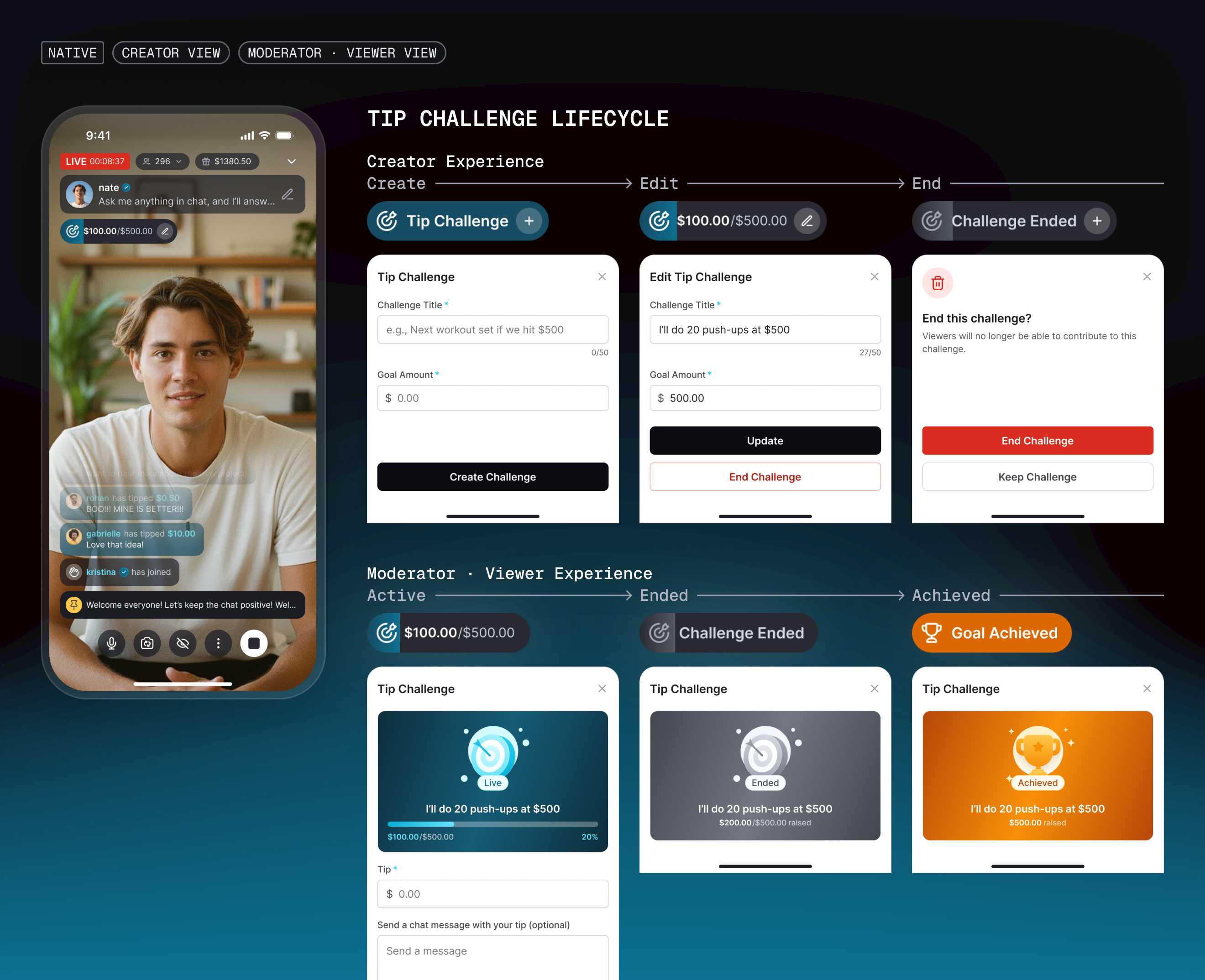
Defining the lifecycle of a live Tip Challenge
The Tip Challenge brief established the core interaction: creators could set a title and tipping goal, viewers could contribute, and progress updated in real time. What remained open was how an active challenge should behave as creators edited, completed, or ended it.
I treated accumulated tips as contribution history, separate from editable challenge settings. Editing a title or goal therefore preserved what viewers had already contributed rather than rewriting the challenge's history.
I also defined the remaining lifecycle states: ending an active challenge required confirmation because it was irreversible, while the completed state preserved enough context for creators and viewers to understand what had ended.
Reframing a custom notification as a clear pre-live action
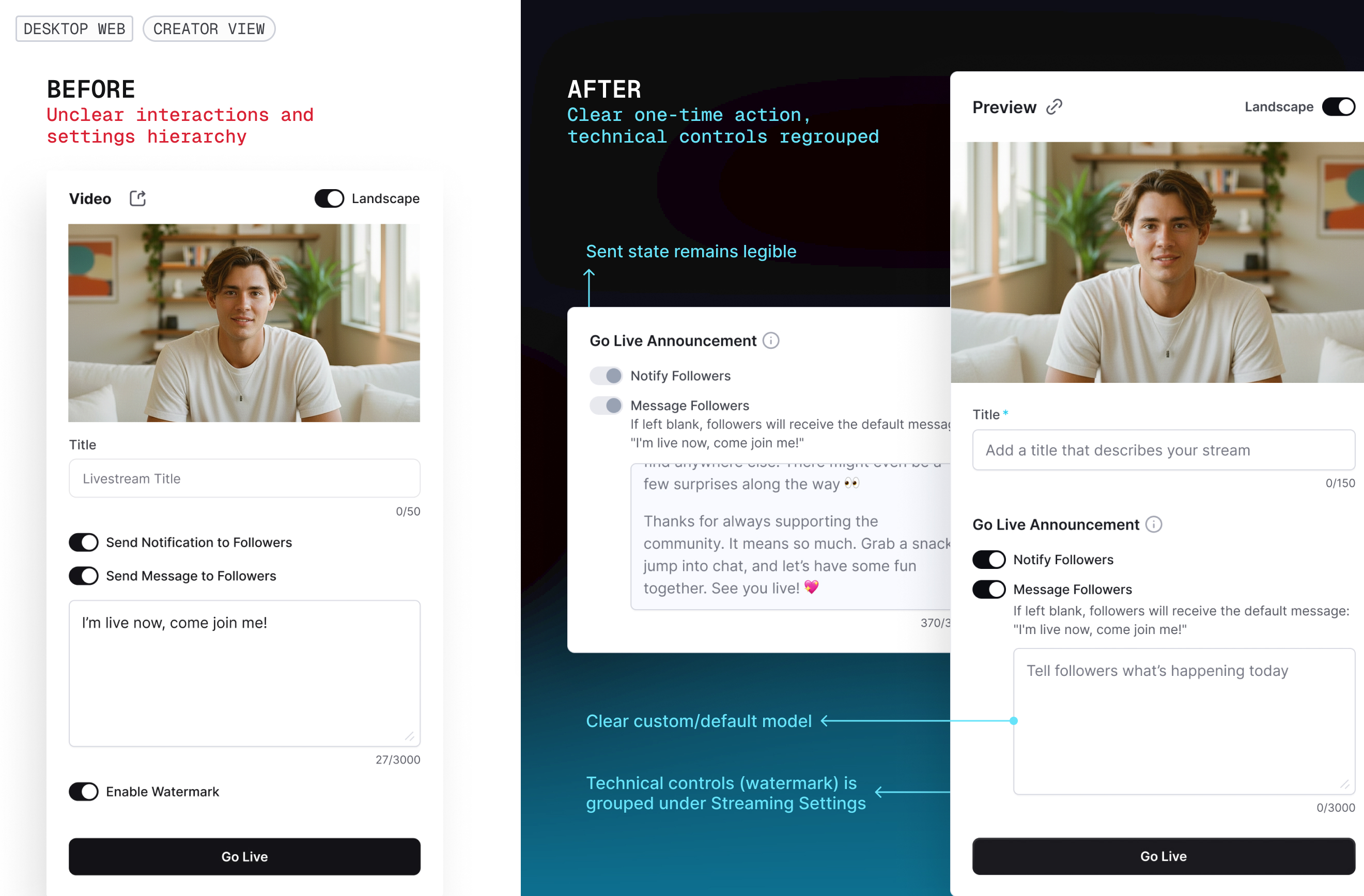
A custom livestream notification had already been partially implemented before design review. The core capability existed, but the interface didn't clearly explain its one-time behavior, distinguish a custom message from the system default, or separate audience communication from technical settings.
I reframed the feature as a Go Live Announcement. Instead of pre-filling the system default, I used an instructional placeholder and explained what followers would receive if the creator left the field blank. Once the stream began, the announcement remained visible but disabled so creators could see that the one-time action had already occurred. I also separated audience communication from technical configuration, grouping technical controls under Streaming Settings rather than allowing the new capability to further fragment the setup experience.
FINAL SYSTEM
Bringing the pieces into one livestream system
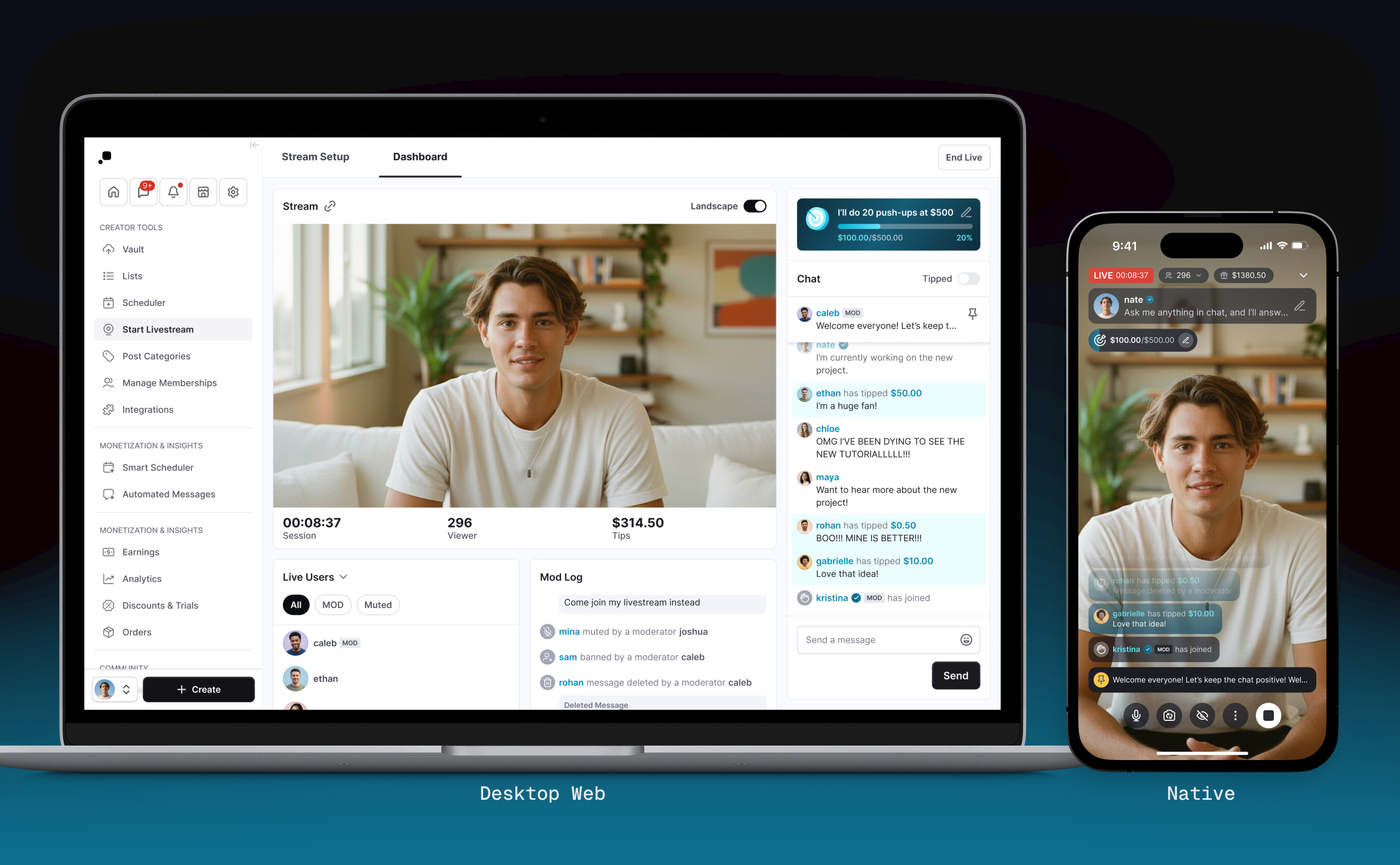
The foundation redesign, workspace architecture, moderation model, and feature-level interactions came together as one livestream system across native and web. The core product logic remained consistent while each surface adapted its layout and information density to its own constraints.
Creator
Moderator
Viewer
REFLECTION
Designing for growth without designing every possible future
The biggest lesson was that scalability isn't the same as maximum flexibility. I had to identify which structural changes the roadmap genuinely depended on while deferring solutions that would expand the system before the need was established.
The project also reinforced a pattern I now look for in feature work: when several requests compete for the same space, roles, or interaction logic, the real design problem may be the system underneath them.
Building the foundation for a scalable livestream experience
ROLE
Product Designer

DURATION
8 Weeks
TEAM
1 Product Manager
1 Product Designer
1 Engineers
Making room for new roles, moderation, and real-time interaction without compromising the core live experience across native and web
Context
Passes is a creator monetization platform where creators earn directly from their audiences through memberships, messaging, livestreams, and other paid experiences. Livestream already supported paid access, real-time chat, and tipping across native and web. I joined the work through feature-level roadmap briefs for new monetization, moderation, audience-management, and creator tools. There was no separate foundation-redesign initiative.
Challenge
Auditing the shipped experience revealed that the existing livestream foundation wasn't ready to absorb that growth. The live interface was already dense, responsive behavior could deprioritize critical interactions, and core viewer behavior varied across platforms, making it difficult to add new capabilities without compounding complexity.
Approach
Rather than continuing to layer features onto the existing experience, I proposed and scoped a focused redesign of the livestream foundation alongside the roadmap. I reworked live hierarchy and responsive behavior, aligned the core viewer model, and introduced clearer operational and role structures before integrating the new capabilities.
Outcome
The redesigned foundation and roadmap capabilities shipped together across native and responsive web, turning Livestream into a more coherent system for real-time interaction, moderation, monetization, and audience management.
AUDIT & SCOPE
The roadmap exposed a deeper problem
Before designing the new capabilities, I tested the shipped creator and viewer experiences across native and responsive web, including different viewport sizes and stream orientations. Three structural constraints consistently surfaced:
- The live interface was already at capacity
- The layout didn't protect live interaction across screen sizes
- Core viewer behavior changed across platforms
The live interface was already at capacity
On native, stream information, creator context, conversation, and controls were already competing for a limited video canvas. Adding moderation, audience management, and monetization directly into the same structure would only increase that competition.
The layout didn't protect interaction across screen sizes
Across responsive web, the layout adapted around the video without reliably preserving the interactions surrounding it. Creator tools could fall below the fold as viewport or video orientation changed, while viewers on smaller screens could lose most of the conversation to video and surrounding UI.
Core viewer behavior changed across platforms
The same livestream exposed different information and behaviors depending on where viewers joined. The differences affected what viewers could understand and how they moved through the experience, not just how the interface looked.
The issue wasn’t visual parity. The same core viewer concepts behaved differently across surfaces.
The feature roadmap was becoming a systems problem
Adding the roadmap feature by feature would preserve the same structural constraints while introducing more roles, states, and controls. I brought the findings to the team and proposed addressing the livestream foundation alongside the roadmap.
Then, to avoid turning the feature roadmap into an open-ended redesign, I focused the foundation work on structural changes that either enabled upcoming capabilities or addressed immediate usability constraints, while deliberately leaving improvements the roadmap didn't depend on for later.
Here’s what I chose to fix:
Create room and structure for new live interactions
Give upcoming capabilities clear places within the live workflow.
Protect participation across responsive states
Keep video, conversation, and critical operational tools usable as space changes.
Align the core viewer model
Make essential stream information and navigation predictable across platforms.
FOUNDATION
Shifting from a video-first layout to an interaction-aware livestream experience
Video remained central, but it could no longer determine whether the interactions around it stayed usable. I reorganized the live surfaces around the information and actions creators and viewers needed most, then defined responsive behavior to preserve those priorities as available space and stream conditions changed.
Creating room on the live canvas
On native, I consolidated persistent stream information and creator context into a more compact hierarchy so the live canvas could support a growing set of interactions without continuously covering more of the video.
Keeping critical interactions in reach
On responsive web, I stabilized video behavior around the interactions users needed to preserve. For creators, I removed layout behavior that pushed operational tools out of reach and kept chat persistently accessible. For viewers, I reduced surrounding UI so conversation remained usable across smaller viewports and video orientations.
Making the viewer model predictable across platforms
I standardized the information and navigation viewers relied on during a stream. Uptime and viewer count became consistently visible, exiting became explicit, and creator identity became an intentional route to the creator profile rather than part of the exit behavior.
With the core layout and viewer model stabilized, the next challenge was deciding where a growing set of real-time information and management tools should live.
ARCHITECTURE
Organizing the workspace around conversation, people, and moderation
As new capabilities entered the roadmap, the challenge shifted from creating enough room to deciding what belonged where. Rather than giving every feature its own surface, I looked for a structure that could organize the growing live experience around stable areas of work.
From a feature list to a workspace architecture
The existing dashboard already needed to support Chat, Tips, Restricted Users, viewer count, and stream metrics. The roadmap was adding Viewer List, Viewer Notes, moderator activity, Mod Log, and Pinned Messages.
I reviewed how established livestream products handled similar complexity. Their strategies ranged from highly configurable workspaces to more constrained dashboards, but a recurring distinction emerged between real-time stream operations and longer-lived configuration or administration.
I used that distinction as an input rather than copying any single dashboard.
Keep real-time work close
Conversation, audience state, and moderation activity need immediate access.
Separate operation from administration
Role management and setup don't need to compete with the active session.
Add structure before configurability
The roadmap could be supported without introducing a fully customizable workspace.
Exploring the architecture
I explored three approaches to distribute the core stream, chat experience, and new capabilities across the creator workspace, then evaluated them against real-time visibility, task coherence, operational focus, and extensibility.
Explored Directions
- A: Add around the existing structureMinimal structural change, but people and moderation tasks remained fragmented.
- B: Consolidate through switchingFewer persistent panels, but high-frequency information competed behind toggles.
- C: Organize around stable areas of live workCreated stable places for conversation, people, and moderation activity while keeping high-frequency information visible.
Evaluation Criteria
- Real-time visibility: Does high-frequency live activity remain visible?
- Task coherence: Are related information and actions kept together?
- Operational focus: Does the workspace prioritize what needs to happen during the stream?
- Extensibility: Can new live states fit without introducing another disconnected surface?
I selected direction C, creating three stable areas of live work: conversation, people, and moderation activity. This kept high-frequency interaction visible while giving audience and moderation workflows dedicated places to grow.
Direction A
Direction B
Direction C
Structuring audience management around live participation
The new Viewer List raised a structural question: should active viewers and restricted users remain separate features, or become part of one people-management model?
I organized them around the live audience instead. Live Users became the default view, with All, MOD, and Muted as states within the active audience. Banned Users remained available as a secondary view because restriction reversals could still be time-sensitive, but banned users no longer competed with active participants in the default view.
The same viewer could now appear in Chat, Live Users, Banned Users, and Mod Log, so I also normalized actions around the object being acted on rather than the panel it came from. Selecting a viewer opened a consistent user context; selecting a message exposed only message-level actions. With the workspace organized, the next question was what context and authority moderators needed to manage it effectively.
MODERATION
Designing moderation as an operational role
The goal of Human Moderation was straightforward: let creators delegate moderation so they could stay focused on hosting. The Product Requirements Document defined a set of moderation actions, but treated moderator access as session-based and assumed moderators would join through the viewer experience with elevated controls.
Working through those assumptions exposed a larger problem: moderation needed a role model, not just more buttons.
Defining a persistent moderator role
The PRD initially treated moderator access as session-based, which would require creators to rebuild the same trusted moderation team for every livestream. Through design review, we reframed it as a persistent role: once assigned, MOD access carried across future streams until the creator removed it or the moderator no longer met a follower requirement.
Making moderator assignment last beyond a single session raised a management question: should moderator management become its own administrative area or remain within Livestream Setup?
I explored a dedicated Moderation area versus keeping moderator management within Stream Setup. A dedicated area offered more room for future moderation policies and tools, but moderation remained livestream-specific with no confirmed broader suite. So, I kept moderator management within Stream Setup rather than introducing a larger administrative architecture prematurely.
Moderators needed operational context, not just controls
The brief also assumed moderators would join through the existing viewer experience with elevated controls. That model worked for isolated actions, but gave moderators little visibility into who was present, what restrictions were active, or what moderation actions had already occurred.
I evaluated keeping moderation within the viewer experience versus extending the creator workspace into a dedicated Moderator View. I chose the dedicated workspace, preserving Chat, Live Users, and Mod Log while removing controls tied to stream ownership, monetization, and role management.
This established a simple responsibility model: Creators own the stream, Moderators manage its health, and Viewers participate.
Designing permissions around valid states
Adding the new role exposed another interaction problem: the same participant could appear as a regular viewer, moderator, muted viewer, or banned viewer, and the actions available to the person moderating them needed to reflect that current state.
For creators, role management and viewer restrictions were mutually constrained. An active moderator first had to lose MOD access before they could be muted or banned, while a restricted viewer had to be unrestricted before they could be assigned as a moderator. Rather than exposing conflicting actions and resolving them afterward, I reflected those rules directly in the action panel so the available actions changed with the participant’s current state.
Moderators followed the same state-aware restriction model, but role assignment remained creator-only.
FEATURE DECISIONS
Turning roadmap briefs into complete product behavior
Alongside the foundation work, the roadmap still contained feature-level questions that couldn’t be resolved by structure alone. The briefs defined the core intent of each capability, but interaction states, edge cases, and surrounding product behavior still needed to be worked through in design.
Defining the lifecycle of a live Tip Challenge
The Tip Challenge brief established the core interaction: creators could set a title and tipping goal, viewers could contribute, and progress updated in real time. What remained open was how an active challenge should behave as creators edited, completed, or ended it.
I treated accumulated tips as contribution history, separate from editable challenge settings. Editing a title or goal therefore preserved what viewers had already contributed rather than rewriting the challenge's history.
I also defined the remaining lifecycle states: ending an active challenge required confirmation because it was irreversible, while the completed state preserved enough context for creators and viewers to understand what had ended.
Reframing a custom notification as a clear pre-live action
A custom livestream notification had already been partially implemented before design review. The core capability existed, but the interface didn't clearly explain its one-time behavior, distinguish a custom message from the system default, or separate audience communication from technical settings.
I reframed the feature as a Go Live Announcement. Instead of pre-filling the system default, I used an instructional placeholder and explained what followers would receive if the creator left the field blank. Once the stream began, the announcement remained visible but disabled so creators could see that the one-time action had already occurred. I also separated audience communication from technical configuration, grouping technical controls under Streaming Settings rather than allowing the new capability to further fragment the setup experience.
FINAL SYSTEM
Bringing the pieces into one livestream system
The foundation redesign, workspace architecture, moderation model, and feature-level interactions came together as one livestream system across native and web. The core product logic remained consistent while each surface adapted its layout and information density to its own constraints.
Creator
Moderator
Viewer
REFLECTION
Designing for growth without designing every possible future
The biggest lesson was that scalability isn't the same as maximum flexibility. I had to identify which structural changes the roadmap genuinely depended on while deferring solutions that would expand the system before the need was established.
The project also reinforced a pattern I now look for in feature work: when several requests compete for the same space, roles, or interaction logic, the real design problem may be the system underneath them.
Building the foundation for a scalable livestream experience
ROLE
Product Designer

DURATION
8 Weeks
TEAM
1 Product Manager
1 Product Designer
1 Engineers
Making room for new roles, moderation, and real-time interaction without compromising the core live experience across native and web
Context
Passes is a creator monetization platform where creators earn directly from their audiences through memberships, messaging, livestreams, and other paid experiences. Livestream already supported paid access, real-time chat, and tipping across native and web. I joined the work through feature-level roadmap briefs for new monetization, moderation, audience-management, and creator tools. There was no separate foundation-redesign initiative.
Challenge
Auditing the shipped experience revealed that the existing livestream foundation wasn't ready to absorb that growth. The live interface was already dense, responsive behavior could deprioritize critical interactions, and core viewer behavior varied across platforms, making it difficult to add new capabilities without compounding complexity.
Approach
Rather than continuing to layer features onto the existing experience, I proposed and scoped a focused redesign of the livestream foundation alongside the roadmap. I reworked live hierarchy and responsive behavior, aligned the core viewer model, and introduced clearer operational and role structures before integrating the new capabilities.
Outcome
The redesigned foundation and roadmap capabilities shipped together across native and responsive web, turning Livestream into a more coherent system for real-time interaction, moderation, monetization, and audience management.
AUDIT & SCOPE
The roadmap exposed a deeper problem
Before designing the new capabilities, I tested the shipped creator and viewer experiences across native and responsive web, including different viewport sizes and stream orientations. Three structural constraints consistently surfaced:
- The live interface was already at capacity
- The layout didn't protect live interaction across screen sizes
- Core viewer behavior changed across platforms
The live interface was already at capacity
On native, stream information, creator context, conversation, and controls were already competing for a limited video canvas. Adding moderation, audience management, and monetization directly into the same structure would only increase that competition.
The layout didn't protect interaction across screen sizes
Across responsive web, the layout adapted around the video without reliably preserving the interactions surrounding it. Creator tools could fall below the fold as viewport or video orientation changed, while viewers on smaller screens could lose most of the conversation to video and surrounding UI.
Core viewer behavior changed across platforms
The same livestream exposed different information and behaviors depending on where viewers joined. The differences affected what viewers could understand and how they moved through the experience, not just how the interface looked.
The issue wasn’t visual parity. The same core viewer concepts behaved differently across surfaces.
The feature roadmap was becoming a systems problem
Adding the roadmap feature by feature would preserve the same structural constraints while introducing more roles, states, and controls. I brought the findings to the team and proposed addressing the livestream foundation alongside the roadmap.
Then, to avoid turning the feature roadmap into an open-ended redesign, I focused the foundation work on structural changes that either enabled upcoming capabilities or addressed immediate usability constraints, while deliberately leaving improvements the roadmap didn't depend on for later.
Here’s what I chose to fix:
Create room and structure for new live interactions
Give upcoming capabilities clear places within the live workflow.
Protect participation across responsive states
Keep video, conversation, and critical operational tools usable as space changes.
Align the core viewer model
Make essential stream information and navigation predictable across platforms.
FOUNDATION
Shifting from a video-first layout to an interaction-aware livestream experience
Video remained central, but it could no longer determine whether the interactions around it stayed usable. I reorganized the live surfaces around the information and actions creators and viewers needed most, then defined responsive behavior to preserve those priorities as available space and stream conditions changed.
Creating room on the live canvas
On native, I consolidated persistent stream information and creator context into a more compact hierarchy so the live canvas could support a growing set of interactions without continuously covering more of the video.
Keeping critical interactions in reach
On responsive web, I stabilized video behavior around the interactions users needed to preserve. For creators, I removed layout behavior that pushed operational tools out of reach and kept chat persistently accessible. For viewers, I reduced surrounding UI so conversation remained usable across smaller viewports and video orientations.
Making the viewer model predictable across platforms
I standardized the information and navigation viewers relied on during a stream. Uptime and viewer count became consistently visible, exiting became explicit, and creator identity became an intentional route to the creator profile rather than part of the exit behavior.
With the core layout and viewer model stabilized, the next challenge was deciding where a growing set of real-time information and management tools should live.
ARCHITECTURE
Organizing the workspace around conversation, people, and moderation
As new capabilities entered the roadmap, the challenge shifted from creating enough room to deciding what belonged where. Rather than giving every feature its own surface, I looked for a structure that could organize the growing live experience around stable areas of work.
From a feature list to a workspace architecture
The existing dashboard already needed to support Chat, Tips, Restricted Users, viewer count, and stream metrics. The roadmap was adding Viewer List, Viewer Notes, moderator activity, Mod Log, and Pinned Messages.
I reviewed how established livestream products handled similar complexity. Their strategies ranged from highly configurable workspaces to more constrained dashboards, but a recurring distinction emerged between real-time stream operations and longer-lived configuration or administration.
I used that distinction as an input rather than copying any single dashboard.
Keep real-time work close
Conversation, audience state, and moderation activity need immediate access.
Separate operation from administration
Role management and setup don't need to compete with the active session.
Add structure before configurability
The roadmap could be supported without introducing a fully customizable workspace.
Exploring the architecture
I explored three approaches to distribute the core stream, chat experience, and new capabilities across the creator workspace, then evaluated them against real-time visibility, task coherence, operational focus, and extensibility.
Explored Directions
- A: Add around the existing structureMinimal structural change, but people and moderation tasks remained fragmented.
- B: Consolidate through switchingFewer persistent panels, but high-frequency information competed behind toggles.
- C: Organize around stable areas of live workCreated stable places for conversation, people, and moderation activity while keeping high-frequency information visible.
Evaluation Criteria
- Real-time visibility: Does high-frequency live activity remain visible?
- Task coherence: Are related information and actions kept together?
- Operational focus: Does the workspace prioritize what needs to happen during the stream?
- Extensibility: Can new live states fit without introducing another disconnected surface?
I selected direction C, creating three stable areas of live work: conversation, people, and moderation activity. This kept high-frequency interaction visible while giving audience and moderation workflows dedicated places to grow.
Direction A
Direction B
Direction C
Structuring audience management around live participation
The new Viewer List raised a structural question: should active viewers and restricted users remain separate features, or become part of one people-management model?
I organized them around the live audience instead. Live Users became the default view, with All, MOD, and Muted as states within the active audience. Banned Users remained available as a secondary view because restriction reversals could still be time-sensitive, but banned users no longer competed with active participants in the default view.
The same viewer could now appear in Chat, Live Users, Banned Users, and Mod Log, so I also normalized actions around the object being acted on rather than the panel it came from. Selecting a viewer opened a consistent user context; selecting a message exposed only message-level actions. With the workspace organized, the next question was what context and authority moderators needed to manage it effectively.
MODERATION
Designing moderation as an operational role
The goal of Human Moderation was straightforward: let creators delegate moderation so they could stay focused on hosting. The Product Requirements Document defined a set of moderation actions, but treated moderator access as session-based and assumed moderators would join through the viewer experience with elevated controls.
Working through those assumptions exposed a larger problem: moderation needed a role model, not just more buttons.
Defining a persistent moderator role
The PRD initially treated moderator access as session-based, which would require creators to rebuild the same trusted moderation team for every livestream. Through design review, we reframed it as a persistent role: once assigned, MOD access carried across future streams until the creator removed it or the moderator no longer met a follower requirement.
Making moderator assignment last beyond a single session raised a management question: should moderator management become its own administrative area or remain within Livestream Setup?
I explored a dedicated Moderation area versus keeping moderator management within Stream Setup. A dedicated area offered more room for future moderation policies and tools, but moderation remained livestream-specific with no confirmed broader suite. So, I kept moderator management within Stream Setup rather than introducing a larger administrative architecture prematurely.
Moderators needed operational context, not just controls
The brief also assumed moderators would join through the existing viewer experience with elevated controls. That model worked for isolated actions, but gave moderators little visibility into who was present, what restrictions were active, or what moderation actions had already occurred.
I evaluated keeping moderation within the viewer experience versus extending the creator workspace into a dedicated Moderator View. I chose the dedicated workspace, preserving Chat, Live Users, and Mod Log while removing controls tied to stream ownership, monetization, and role management.
This established a simple responsibility model: Creators own the stream, Moderators manage its health, and Viewers participate.
Designing permissions around valid states
Adding the new role exposed another interaction problem: the same participant could appear as a regular viewer, moderator, muted viewer, or banned viewer, and the actions available to the person moderating them needed to reflect that current state.
For creators, role management and viewer restrictions were mutually constrained. An active moderator first had to lose MOD access before they could be muted or banned, while a restricted viewer had to be unrestricted before they could be assigned as a moderator. Rather than exposing conflicting actions and resolving them afterward, I reflected those rules directly in the action panel so the available actions changed with the participant’s current state.
Moderators followed the same state-aware restriction model, but role assignment remained creator-only.
FEATURE DECISIONS
Turning roadmap briefs into complete product behavior
Alongside the foundation work, the roadmap still contained feature-level questions that couldn’t be resolved by structure alone. The briefs defined the core intent of each capability, but interaction states, edge cases, and surrounding product behavior still needed to be worked through in design.
Defining the lifecycle of a live Tip Challenge
The Tip Challenge brief established the core interaction: creators could set a title and tipping goal, viewers could contribute, and progress updated in real time. What remained open was how an active challenge should behave as creators edited, completed, or ended it.
I treated accumulated tips as contribution history, separate from editable challenge settings. Editing a title or goal therefore preserved what viewers had already contributed rather than rewriting the challenge's history.
I also defined the remaining lifecycle states: ending an active challenge required confirmation because it was irreversible, while the completed state preserved enough context for creators and viewers to understand what had ended.
Reframing a custom notification as a clear pre-live action
A custom livestream notification had already been partially implemented before design review. The core capability existed, but the interface didn't clearly explain its one-time behavior, distinguish a custom message from the system default, or separate audience communication from technical settings.
I reframed the feature as a Go Live Announcement. Instead of pre-filling the system default, I used an instructional placeholder and explained what followers would receive if the creator left the field blank. Once the stream began, the announcement remained visible but disabled so creators could see that the one-time action had already occurred. I also separated audience communication from technical configuration, grouping technical controls under Streaming Settings rather than allowing the new capability to further fragment the setup experience.
FINAL SYSTEM
Bringing the pieces into one livestream system
The foundation redesign, workspace architecture, moderation model, and feature-level interactions came together as one livestream system across native and web. The core product logic remained consistent while each surface adapted its layout and information density to its own constraints.
Creator
Moderator
Viewer
REFLECTION
Designing for growth without designing every possible future
The biggest lesson was that scalability isn't the same as maximum flexibility. I had to identify which structural changes the roadmap genuinely depended on while deferring solutions that would expand the system before the need was established.
The project also reinforced a pattern I now look for in feature work: when several requests compete for the same space, roles, or interaction logic, the real design problem may be the system underneath them.